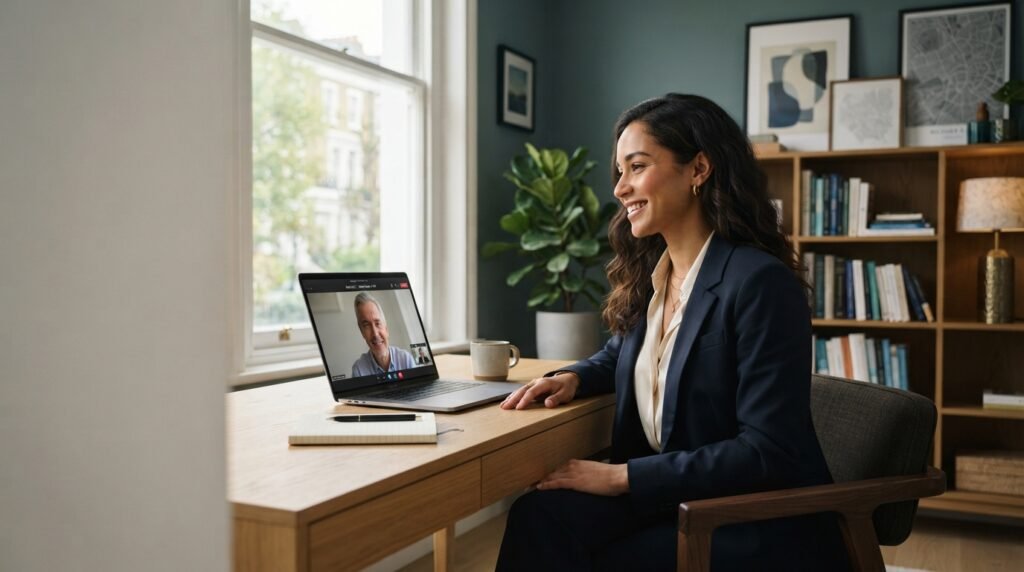
The traditional handshake has changed. Today, your first interaction with a potential employer may happen through a video call, a virtual meeting platform, or an online screening interview.
For professionals preparing for remote opportunities, the ability to communicate confidently through a screen is an important part of interview preparation.
A successful remote job interview requires more than a working webcam. You need to prepare your technology, communicate clearly, demonstrate your skills, and create a professional impression throughout the conversation.
The good news is that you do not need an expensive home office or advanced equipment to make a strong impression. With the right preparation, you can approach your next virtual interview with greater confidence.
Here are 10 practical remote job interview tips to help you prepare.
1. Test Your Technology Before the Interview
Technical problems can interrupt an interview and distract you from demonstrating your abilities.
Before the scheduled meeting, check your internet connection, camera, microphone, headphones, laptop battery, and meeting link. If the interviewer has requested specific software, install it and confirm that it works correctly.
It is also helpful to test your audio and video with a friend before the interview.
Try to join the meeting a few minutes early, following the interviewer’s instructions. Keep the recruiter’s contact details available in case you experience connection problems.
Preparing your technology in advance allows you to focus on the conversation instead of troubleshooting.
2. Choose a Professional Interview Environment
Your surroundings contribute to the overall impression you create during a remote job interview.
Choose a quiet location with good lighting and minimal distractions. Keep your background reasonably tidy, and position yourself where your face is clearly visible.
Natural light facing you often works well. If you are using a lamp, avoid placing it directly behind you because it can make your face appear dark.
Position your camera around eye level and sit at a comfortable distance from the screen.
You do not need a professional studio. A simple, quiet, well-organized space is usually sufficient.
If you share your home with other people, let them know when the interview will take place so interruptions are less likely.
3. Maintain Natural Eye Contact
Maintaining eye contact during a virtual interview can feel different from speaking with someone in person.
When answering a question, occasionally look toward the camera to create a stronger sense of direct engagement. When listening, looking at the screen helps you follow the interviewer’s expressions and reactions.
You do not need to stare continuously at the camera. Aim for natural eye contact that supports a comfortable conversation.
If you tend to look at your own video instead of the interviewer, try hiding your self-view if the meeting platform allows it.
Small adjustments can make virtual communication feel more natural and confident.
4. Pay Attention to Body Language
Your body language still matters during an online interview.
Your posture, facial expressions, gestures, and attentiveness can communicate interest and professionalism even through a screen.
Sit upright but comfortably. Keep your movements natural, and avoid repeatedly checking your phone, looking away for long periods, or interrupting the interviewer.
Nod when appropriate to show that you are following the conversation, and maintain a calm, attentive expression.
The goal is not to appear perfectly rehearsed. It is to communicate that you are engaged, prepared, and interested in the opportunity.
5. Prepare for Common Remote Interview Questions
Remote interviews often cover the same essential topics as traditional interviews.
Prepare for questions such as:
- Tell me about yourself.
- Why are you interested in this position?
- What are your strongest professional skills?
- Tell me about a challenging problem you solved.
- What professional achievement are you most proud of?
- Why are you considering a career move?
- What are your career goals?
Review the job description and identify the experience and skills the employer is likely to value.
Instead of memorizing complete answers, prepare a few key points and examples. This approach helps you respond naturally while ensuring that you communicate the most relevant information.
Practice speaking your answers aloud so you can improve clarity, pacing, and confidence.
6. Support Your Answers With Specific Examples
General statements about your abilities are less convincing than examples that demonstrate what you can do.
For instance, saying, “I am a strong problem-solver,” does not explain how you have used that ability in a professional setting.
Instead, describe a relevant situation, explain your responsibility, discuss the actions you took, and share the outcome.
You can use the STAR method:
- Situation: Explain the context or challenge.
- Task: Describe what you needed to accomplish.
- Action: Explain the steps you personally took.
- Result: Share the outcome and what you learned.
For example, if you helped a team resolve a project delay, explain how you identified the problem, coordinated the necessary changes, and contributed to completing the work.
Where possible, use genuine results and measurable evidence. Never invent achievements or exaggerate your responsibilities.
Specific examples help employers understand how you approach challenges and contribute to a team.
7. Communicate Clearly and Confidently
Online conversations can sometimes feel less natural because of audio delays, background noise, or interruptions.
Speak at a comfortable pace and use clear language. Pause briefly before answering complex questions, and make sure you understand what the interviewer is asking.
If you cannot hear a question properly, politely ask the interviewer to repeat it.
For example, you might say, “I’m sorry, the audio briefly cut out. Could you please repeat the last part of the question?”
Keep your answers focused and relevant. Provide enough detail to explain your experience without turning every response into a lengthy speech.
Good communication is not about speaking continuously. It is about expressing your ideas clearly and listening carefully to the other person.
8. Keep Your Resume and Portfolio Ready
Some interviewers may ask you to explain a previous project, discuss a professional achievement, or share your screen.
Prepare the materials you may need before the meeting, including:
- An updated resume.
- Your portfolio or relevant work samples.
- Examples of completed projects.
- Relevant certifications or qualifications.
- Notes about the company and position.
- Questions you want to ask the interviewer.
Organize your files so that you can find them quickly. Close unrelated browser tabs and confidential documents before sharing your screen.
If you are discussing previous work, be prepared to explain your role, the decisions you made, and the results you achieved.
For confidential projects, only share information you are authorized to disclose.
Preparation helps you respond promptly without appearing distracted or disorganized.
9. Research the Employer and Ask Thoughtful Questions
An interview is an opportunity for both sides to assess whether the role is a suitable match.
Before the meeting, review the employer’s website, the job description, the organization’s services, and any publicly available information relevant to the position.
Identify how your experience connects with the role’s responsibilities.
Prepare a few thoughtful questions, such as:
- What would success look like during the first three months?
- What are the main priorities for this position?
- How does the team collaborate on projects?
- What challenges would the successful candidate help address?
- What are the next steps in the recruitment process?
Listen carefully throughout the interview and adapt your questions to the discussion.
Research and relevant questions demonstrate genuine interest while helping you understand the opportunity more clearly.
10. Prepare a Backup Plan for Technical Problems
Even when you prepare carefully, technology can sometimes fail.
Your internet connection might drop, your microphone may stop working, or the meeting platform could experience an interruption.
Know what you will do if this happens. Keep your phone charged and have an alternative way to contact the interviewer when appropriate.
If a problem occurs, remain calm. Notify the interviewer as soon as possible and follow any instructions they provide.
You could say, “I’m experiencing a temporary connection issue. I’ll try to reconnect immediately and will contact you if the problem continues.”
A technical problem does not automatically create a negative impression. Clear communication and a practical response can help you manage the situation professionally.
Common Remote Interview Mistakes to Avoid
Even qualified candidates can undermine their performance through avoidable mistakes.
Before your next virtual interview, try to avoid:
- Joining without testing your microphone or camera.
- Reading answers directly from a script.
- Looking distracted or checking your phone.
- Giving vague answers without supporting examples.
- Interrupting the interviewer or speaking too quickly.
- Sharing unrelated or confidential material on screen.
- Failing to research the employer.
- Forgetting to prepare questions about the role.
Reviewing these points before the meeting can help you feel more prepared and make the conversation more productive.
Frequently Asked Questions About Remote Job Interviews
How early should I join a remote job interview?
Aim to be ready a few minutes before the scheduled start time. Test your equipment beforehand and follow any instructions provided by the interviewer or recruitment team.
What should I wear for a virtual interview?
Choose professional clothing that is appropriate for the role and organization. When you are unsure about the expected dress code, a neat, professional outfit is a sensible choice.
How can I appear confident during a video interview?
Prepare relevant examples, test your technology, speak clearly, maintain natural eye contact, and listen carefully. Practicing aloud can also help you become more comfortable with your answers.
Should I look at the camera or the screen?
Look toward the camera periodically while speaking to create a sense of direct engagement. Look at the screen when listening to the interviewer. A natural balance is more important than maintaining constant eye contact.
What should I do if my internet connection fails during an interview?
Try to reconnect promptly. If the problem continues, contact the interviewer through an agreed alternative method and explain the situation calmly. Keeping a charged phone available can be helpful.
How should I end a remote job interview?
Thank the interviewer for their time, briefly reinforce your interest in the position, and ask about the next steps if they have not already explained them.
Final Thoughts
A successful remote job interview is not about having the most expensive equipment or delivering perfectly memorized answers.
It is about combining preparation, professional communication, relevant experience, and genuine engagement.
When you test your technology, create a suitable environment, prepare meaningful examples, and research the employer, you give yourself a better opportunity to demonstrate your value.
The digital handshake may look different from the traditional one, but the principle remains the same: make a professional first impression, communicate your strengths clearly, and show why you are a strong candidate for the opportunity.
Preparing for Your Next Career Opportunity?
Ahsan Careers helps professionals navigate career opportunities and provides recruitment-related support for organizations.
Whether you are preparing for an important interview or exploring your next professional step, taking the time to present your skills and experience effectively can make a meaningful difference.
Visit Ahsan Careers to learn more about its services and explore the available resources.